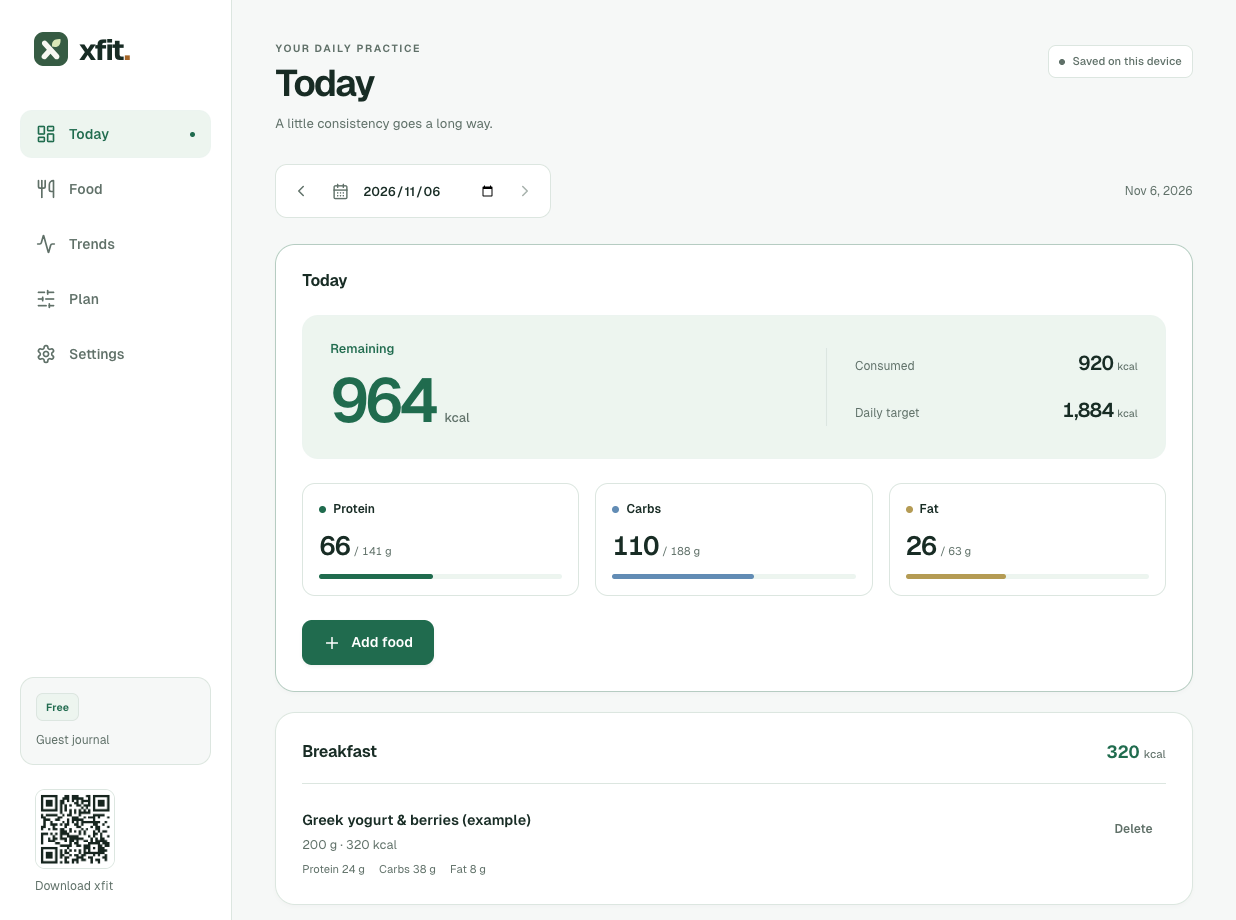
xfit brings your meals, weight trend and daily nutrition into one journal. Enter the portion you ate in grams, and xfit scales the food's nutrition values per 100 g to your meal. Start free, without an account, and keep your everyday records in view.
Daily food and macro tracking, recipes and weight trends are free in xfit. Record protein, carbs and fat in grams alongside calories. When converting a calorie target into macro goals, xfit uses 4 kcal per gram for protein and carbs, and 9 kcal per gram for fat.
Can I start without an account?
You can calculate targets and start your xfit journal without an account. Guest records stay on your device, so you can begin with the food and weight entries you have today. Sign in when you want to bring those records into your account and sync across devices for free.
How can I follow weight changes?
xfit shows your recorded weight alongside a smoothed trend so you can review changes over time. Each new reading updates the trend, with the time between weigh-ins taken into account. Keep your daily food log, measurements and progress photos alongside it to give those changes more context.
What does my daily journal show?
The xfit journal shows your meals and remaining calorie and macro balances together. Macro targets are shown in grams: for example, allocating 30% of a 2,000 kcal target to protein gives 150 g of protein. Your own balances follow your saved plan and logged portions. Add a food or revisit a recipe as your day unfolds.
Example journal
How does tracking fit into your day?
Start with a calorie target, record what you eat, and review how your weight trend develops. xfit keeps your plan and daily records together, so you can compare your intake with your targets and return to your weigh-ins over time. Follow these steps at your own pace.
01
How do I set my starting target?
The xfit TDEE calculator estimates your daily energy needs and turns a chosen macro split into gram targets. Its balanced preset assigns 30% of energy to protein, 40% to carbs and 30% to fat. Review the estimates, choose a split that fits your needs, then save your plan. These are planning presets, not clinical recommendations.
02
How do I record a meal?
Log a meal by searching foods, scanning a barcode where supported, or adding your own food. Enter the portion in grams; xfit scales the nutrition values per 100 g to that amount. Save favorites and recipes so you can reuse familiar foods and adjust the portion next time.
03
How do I review my progress?
Add weigh-ins to see your recorded weight and smoothed trend together in xfit. The first reading starts the trend; later entries update it according to the time since your previous weigh-in. Review measurements and progress photos alongside your food records when you want to look back at what changed.
What can I keep in my journal?
xfit keeps food entries and weight records together so you can review both in the same journal. Log breakfast, lunch, dinner or snacks, then return to your weight trend, measurements and progress photos. Saved foods and recipes help you record familiar meals with the portion you ate today.
Food & macros
How do I reuse my usual meals?
xfit lets you reuse favorites and recipes, search Open Food Facts, or add a food manually. Nutrition is stored per 100 g and scaled to your logged portion: a 150 g portion uses 1.5 times those values. Check the portion before saving to record its calories, protein, carbs and fat.
Weight & measurements
How does xfit smooth weight changes?
xfit uses a smoothed trend to put daily weight changes in context. For weigh-ins on consecutive dates, the new trend combines 75% of the previous trend with 25% of the new weight. The first reading initializes the trend, and gaps between dates change the weighting. Review it alongside your measurements and progress photos.
Adaptive planning · Pro
When can my records update my plan?
xfit Pro estimates your energy needs from complete food records and weight trends. When records qualify, each weekly adjustment changes your daily calorie target by at most 100 kcal or 5% of the current target, whichever is smaller. Calibration needs the preceding 14 days marked complete with positive logged intake, plus at least 7 distinct weigh-ins spanning 10 days in that window. Estimates are not medical advice.
Local records & free sync
Can I keep records offline?
xfit saves guest records on your device, including entries made offline. You can keep a local journal before deciding to sign in. Signing in brings those records into your account and enables free sync across devices. An internet connection is needed to sync; saving a local entry does not depend on sync finishing.
xfit Pro
What does xfit Pro add?
xfit Pro adds adaptive estimates, flexible plans and AI-assisted logging to your daily records. Its carb-cycling plan sets high days 10% above your daily calorie target and low days 7.5% below it, while also changing the macro split. Plans with a day below your estimated basal metabolic rate (BMR) are rejected. These settings are planning tools, not clinical recommendations.
AI food drafts from text, photos or audio, reviewed by you before saving.
Weekly energy calibration when your food and weight records are sufficiently complete.
Plans for cutting, maintenance, bulking, carb cycling and flexible weekends.
Where can you start with your goal?
Use xfit's free nutrition, body measurement and training calculators to explore your starting point. The TDEE calculator estimates energy needs and turns calorie and macro targets into grams. For example, its high-protein preset assigns 40% of energy to protein, 35% to carbs and 25% to fat. Presets are planning tools, not clinical recommendations; review the estimates against your own needs.
How does energy calibration work?
Pro uses your food and weight records to calibrate your energy estimate. Calibration needs the preceding 14 days marked complete with positive logged intake, plus at least 7 distinct weigh-ins spanning 10 days. Missing records never count as zero intake. Each weekly adjustment changes your daily calorie target by no more than 100 kcal or 5% of the current target, whichever is smaller. Estimates are not medical advice.
Do I need an account to start?
No. You can calculate targets and track food, recipes and weight trends in xfit as a guest. Records stay on your device, including entries made offline. Signing in brings them into your account and enables free sync across devices when you have an internet connection.
What is free, and what does Pro add?
Daily food and macro tracking, recipes, weight trends, measurements, progress photos and basic account sync are free in xfit. Pro adds adaptive estimates, flexible plans and AI food drafts from text, photos or audio. You can keep using the free journal without choosing Pro.
Does AI save meals automatically?
No. xfit Pro turns text, photos or audio into a food draft for you to review. Check the foods, portion weights and nutrition values before saving. If you ate half a portion, you can select 50% consumed. AI estimates can be wrong, so the final entry stays in your hands.
When can Pro calibrate my energy estimate?
Calibration needs the preceding 14 days marked complete with positive logged intake, plus at least seven distinct weigh-ins spanning ten days. Missing records never count as zero intake. Each weekly adjustment changes your daily calorie target by no more than 100 kcal or 5% of the current target, whichever is smaller. Estimates are not medical advice.
Start with your next meal.
Open your xfit journal and make your first food entry as a guest. Choose a food, check its nutrition values per 100 g, and enter the portion you ate. Daily tracking is free, and you can save familiar foods for your next meal.